Before You Begin
Make sure you have everything ready. Check off each item as you go:
- I have a MetaTrader 5 account with a broker (ICMarkets, Pepperstone, Exness, etc.) — account type must be Raw Spread or ECN. Other account types may produce different results.
- My broker offers XAUUSD (Gold) for trading
- I have at least $2,000 in my account (minimum required for all profiles)
- I have MetaTrader 5 downloaded and installed on my computer or VPS
- I understand that trading involves risk and past results do not guarantee future performance
Installing the EA
Setting Up Your Chart
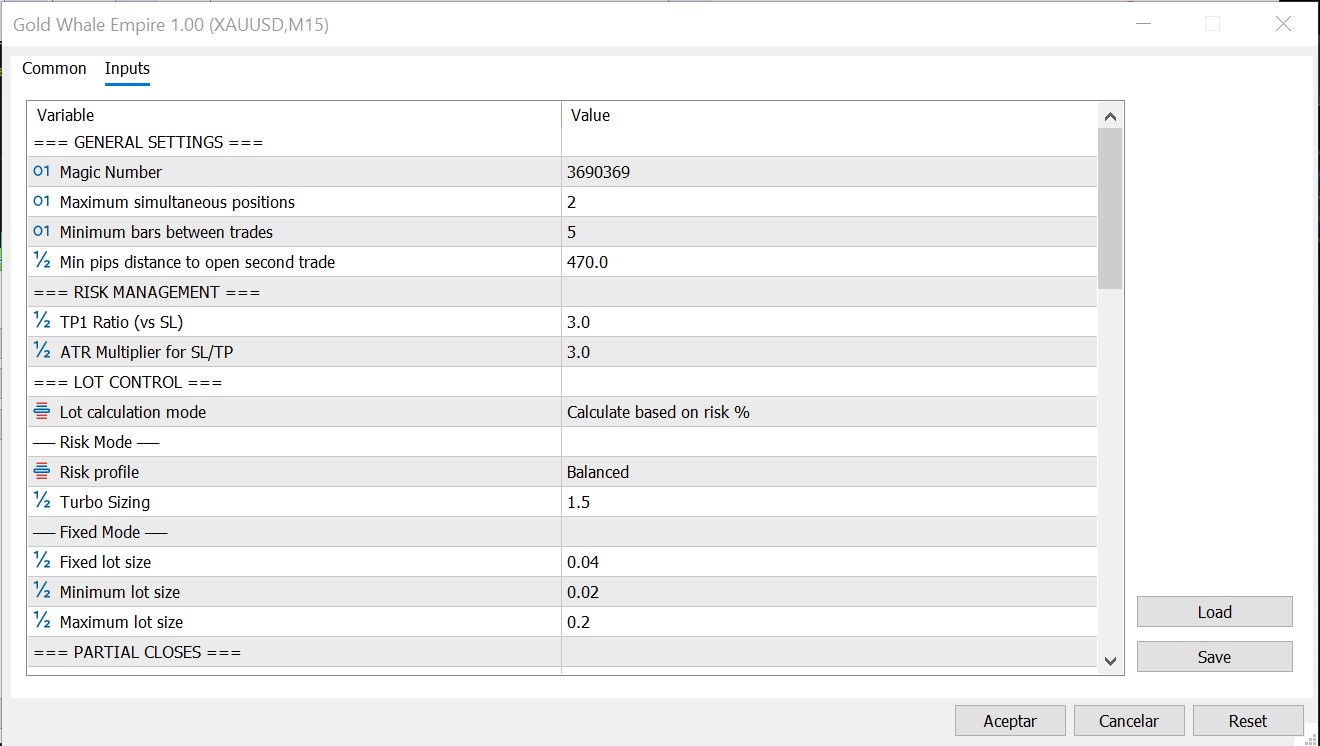
The Inputs tab where you configure your risk profile and trading parameters
Choosing Your Risk Profile
Click a profile to learn more. This is the most important setting you'll choose.
Understanding the Dashboard
Once the EA is running, you'll see several visual elements on your chart. Here's what each one does:
Neon Panel
Your main cockpit. Shows account balance, equity, today's profit/loss, number of active trades, and current signal strength. Updated in real-time.
Trend Compass
A visual arrow showing if gold is trending UP or DOWN. Green means buy territory, red means sell territory. The bigger the arrow, the stronger the trend.
Signal Monitor
Shows the live signal analysis in real time. When all conditions are met, a trade triggers automatically. Helps you understand why the EA is or isn't trading.
Session Info (Top Scrolling Text)
The scrolling text at the top of the chart. Displays which trading sessions are currently active (London, New York, Asian) and how much time is left in the current session.
Market Ticker (Bottom Scrolling Text)
The scrolling text at the bottom of the chart. Shows real-time market data like DXY movement, current spread, and other relevant information.
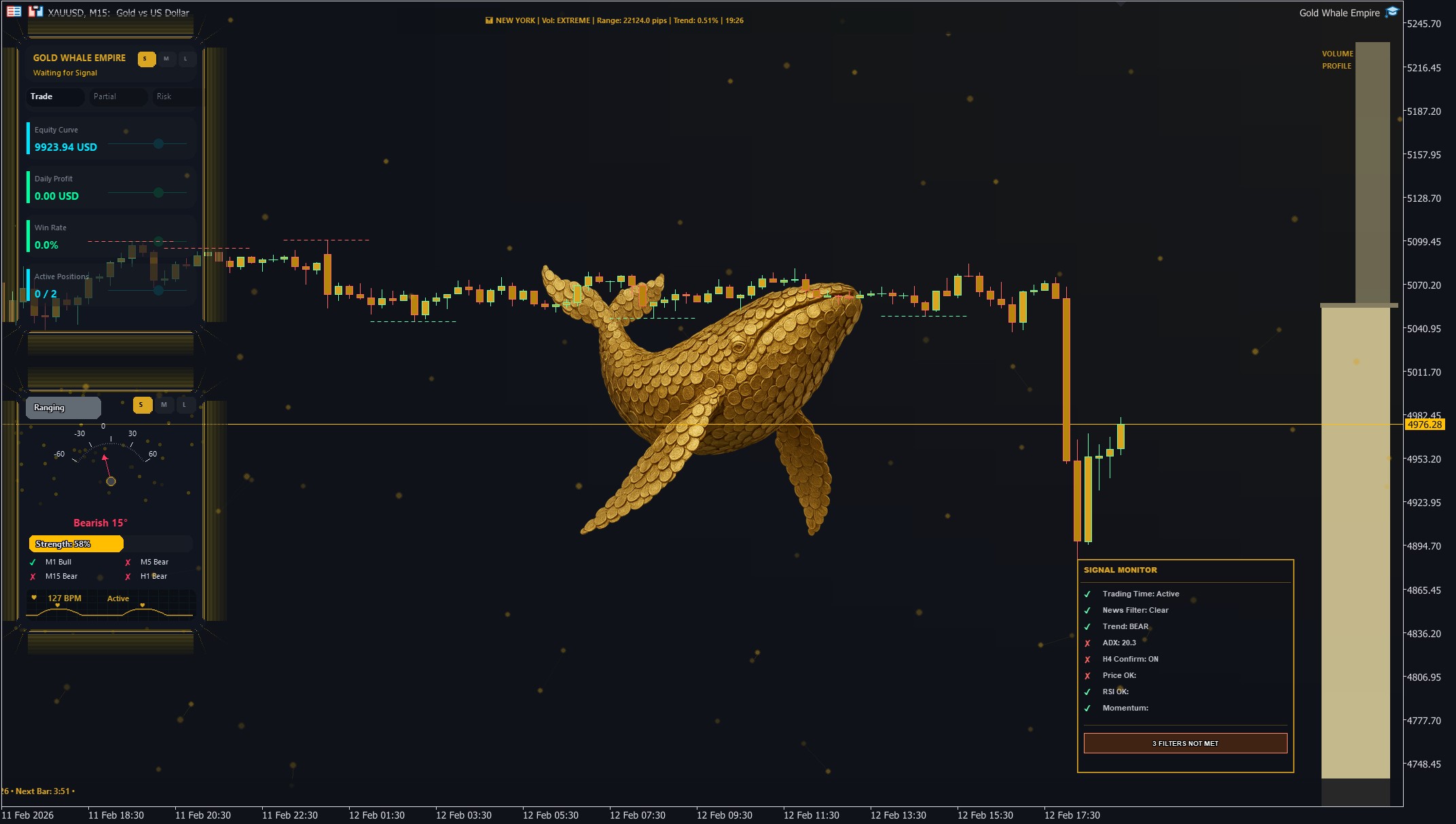
Gold Whale Empire dashboard running live on a XAUUSD M15 chart
Your First Trade
What to expect after you attach the EA:
Key Settings You Might Adjust
The default settings work great for most traders. But here are the ones you might want to tweak:
DailyProfitTargetPercent (default: 9%)
When your daily profit hits this percentage of your account, ALL trades close. Lower this for a more conservative daily cap.
Trading Hours
You can adjust StartHour and EndHour to set your preferred trading window. The default range (1:00 to 22:00) is intentionally wide to give the EA maximum flexibility to monitor the market and enter on the best opportunities.
Partial Close Settings
We recommend keeping the default partial close values as they are. These control when and how much of a trade is closed as profit progresses: FirstPartialAt, FirstPartialSize, SubsequentPartialEvery, and SubsequentPartialSize. You can modify them for a different trading style, but this will result in different performance and results. Always test changes on a demo account first.
Important Tips
✅ DO
- Use a VPS for 24/5 uninterrupted operation
- Start with a demo account for at least 2 weeks
- Let the EA run — this is an EA designed to navigate the markets constantly. There will be good months and bad months, but fundamentally, the bad months won't be that bad, and the good months will be excellent
- Keep your MT5 terminal open and connected
- Monitor your account periodically
- Respect the risk profile you chose
❌ DON'T
- Manually close the EA's trades
- Run on timeframes other than M15
- Use on symbols other than XAUUSD
- Change settings while trades are open
- Over-leverage beyond your risk profile
- Panic during normal drawdowns
- Run it alongside other EAs on the same account — Gold Whale Empire calculates lot sizes based on your account balance. If another EA wins or loses, it changes your balance and causes incorrect lot sizing